Nine sports · Mac and Windows

Turn your GPS log into gauges on your video

Data Overlay reads the file from your watch, bike computer, dive computer or ForeFlight and exports a transparent overlay that lines up with your footage frame for frame. Put it on the track above your clip in Premiere Pro or Final Cut Pro and you're done.

From $19.99 a month, $79.99 a year or $129.99 once

Sports
Aviation, hiking, running, mountain biking, road cycling, scuba, climbing, parachuting, indoor cycling
Reads
FIT, GPX, TCX, KML, CSV, UDDF, Subsurface, FlySight
Exports
ProRes 4444 with alpha (Mac), PNG MOV, PNG sequence
Runs on
macOS 13.5+ on Apple silicon · Windows 10 and 11
DataOverlay-aviation_2026-09-20_140500.mov2136 × 680 · RGBA · 29.97 fps
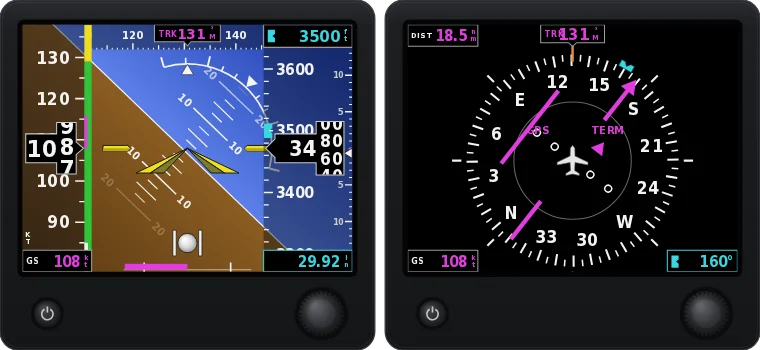
A real export from Aviation mode: G5-style attitude and HSI plus the moving map, rendered from a demo flight (KSRQ to KVNC) and shown at 4× speed. Everything around the instruments is transparent, so your footage shows through.

Reads the files you already have

  • Garmin watches, Edge and Descent
  • Zwift and smart trainers
  • Strava GPX
  • Apple Health route GPX
  • HealthFit
  • ForeFlight
  • Subsurface
  • FlySight 1 and 2

How it works

From log file to timeline in three steps

No templates and no keyframes. The gauges move with your data because they are drawn from it.

  1. Open your log and your clip

    Drop in the activity file and the video you exported from your camera. Data Overlay picks the sport from the file. You can combine files too, like GPS from your watch and heart rate from a chest strap.

  2. Line it up and pick your gauges

    Line the data up with your video and nudge it in tenths of a second. In Aviation mode you can mark wheels-up right on the frame. Start with the sport's main gauges or turn on everything, and arrange them in a row, a stack, a panel or anywhere you like.

  3. Export and drop it on V2

    Export at your sequence's frame rate. The overlay has exactly as many frames as your clip, so it lines up when both start on the same frame.

Live demo · nine sports

Pick your sport and try the real app

This is Data Overlay running in your browser with sample data. Turn gauges on and off, drag them around, change units and colours, and scrub through the activity. Opening your own files and exporting happen in the desktop app.

What each sport shows

  • G5-style attitude indicator and HSI drawn from the demo flight at 108 knots groundspeed, track 131 degrees.

    Aviation

    G5-style attitude and HSI, the classic six-pack and a moving map, from your ForeFlight GPX, KML or CSV track log.

    Try aviation in the demo
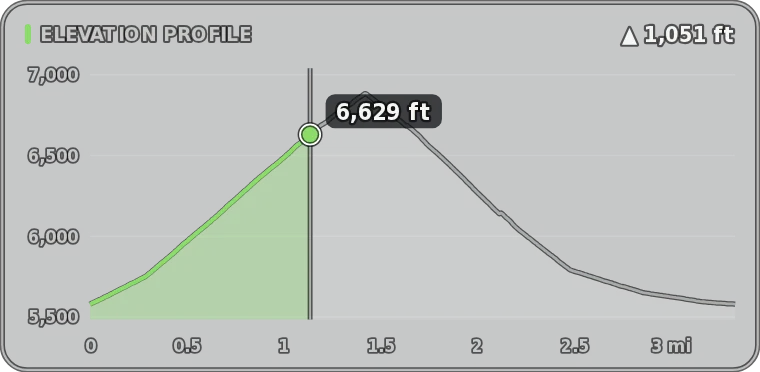
  • Elevation profile of a hike with a moving dot at 6,629 feet and 1,051 feet climbed.

    Hiking

    Elevation profile with a moving dot. Also elevation, gain, distance, grade, pace, heart rate, compass, position and time.

    Try hiking in the demo
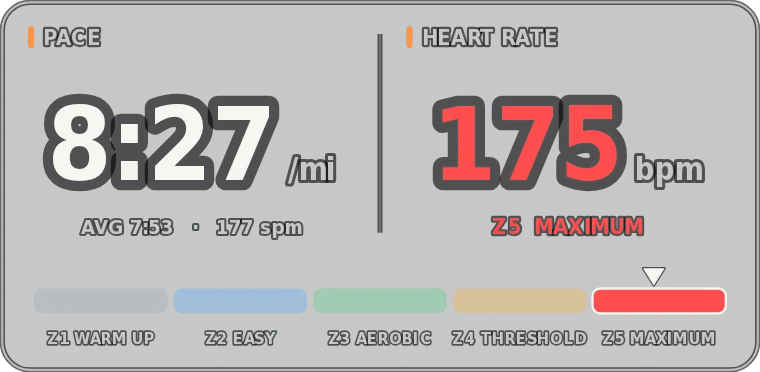
  • Pace of 8:27 per mile and heart rate of 175 bpm in zone 5, with the five heart-rate zones.

    Running

    Pace and heart-rate zone. Also average pace, cadence, splits, power and grade.

    Try running in the demo
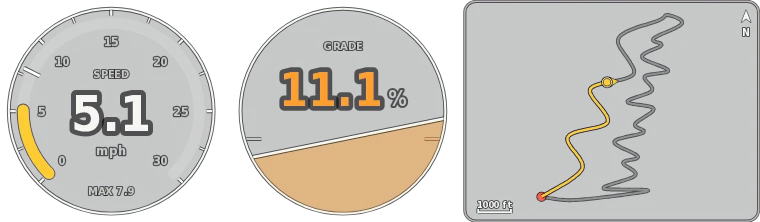
  • Speedometer at 5.1 mph, an 11.1 percent grade dial and a mini-map of the trail.

    Mountain biking

    Speedometer, grade and mini-map. Also G-force, gain and loss, power, cadence and heading.

    Try mountain biking in the demo
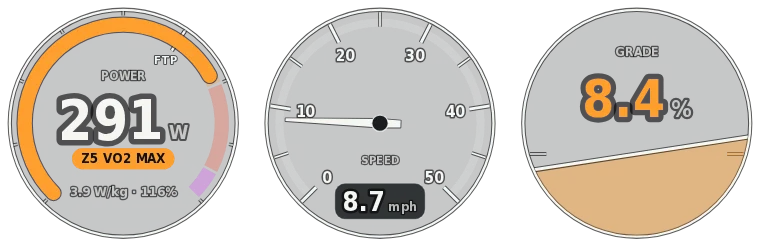
  • Power gauge at 291 watts in zone 5 with 3.9 W/kg, a speed dial and an 8.4 percent grade dial.

    Road cycling

    Power gauge with W/kg, % FTP and zone, plus speed and grade. Also VAM, heart rate, cadence and temperature.

    Try road cycling in the demo
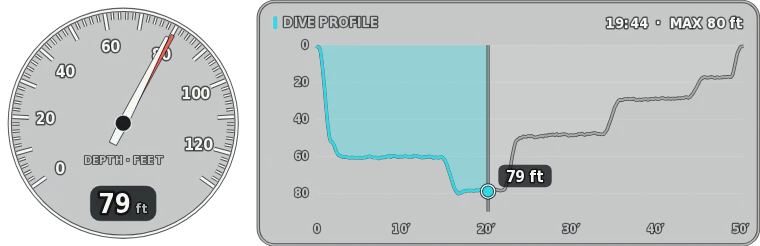
  • Depth gauge at 79 feet and the dive profile to a maximum depth of 80 feet.

    Scuba diving

    Depth gauge and dive profile. Also NDL from your log or Bühlmann ZHL-16C, tank pressure, gas, SAC, ascent rate and water temperature.

    Try scuba diving in the demo
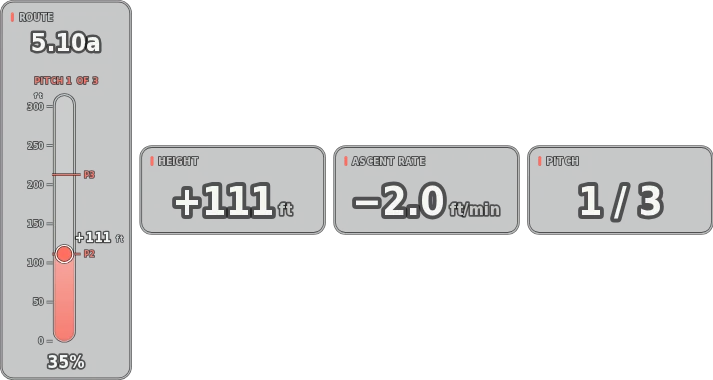
  • Route-progress gauge for a 5.10a route on pitch 1 of 3, with height, ascent rate and pitch readouts.

    Rock climbing

    Vertical route-progress gauge. Also pitch count, route name and grade, height, vertical gained and ascent rate.

    Try rock climbing in the demo
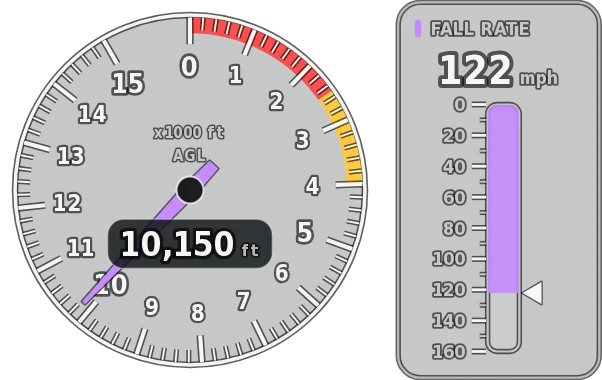
  • Altimeter at 10,150 feet above ground and a fall-rate tape at 122 mph.

    Parachuting

    AGL altimeter and fall-rate tape. Also freefall time, glide ratio, horizontal speed, deployment altitude and jump profile. Reads FlySight 1 and 2.

    Try parachuting in the demo
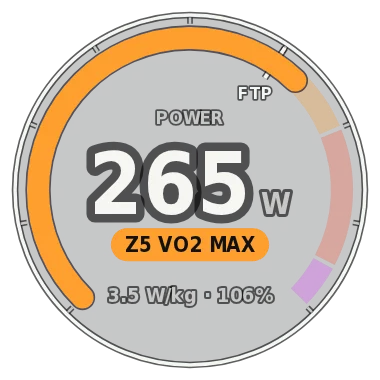
  • Power gauge at 265 watts in zone 5 with 3.5 W/kg and 106 percent of FTP.

    Indoor cycling

    Power and zone gauge. Also % FTP, cadence, heart rate, resistance, calories and a virtual speed worked out from power and weight.

    Try indoor cycling in the demo

Pictures are straight from the app, drawn from its sample data. Gauges show the data your files contain. Units, heart-rate zones, FTP and weight are set in the app, in imperial or metric.

Built for the edit

Made to drop straight into your timeline

  • ProRes 4444 · PNG MOV · PNG sequence

    Transparent, frame-exact exports

    Choose ProRes 4444 with alpha on a Mac, or lossless PNG on either platform. Export at your sequence's frame rate and the overlay has exactly as many frames as your clip.

  • Every CPU core

    Fast, even for long days

    Exports use every core. On the Macs and PCs we've tested they run at a few hundred frames per second, so an hour of footage renders in minutes. On Macs with a ProRes engine, encoding runs in hardware.

  • Best source for each gauge

    Combine files

    Take GPS from your watch, heart rate from a chest strap and power from your bike computer. Each gauge uses the best file that has its data, with a clock offset for each file.

  • ±0.1 s

    Sync to the frame

    Nudge each file's clock in tenths of a second until the gauges match the picture. In Aviation mode, mark wheels-up or touchdown on the video. Files recorded on a local clock are lined up with UTC files for you.

  • Row · Stacked · Panel · Custom

    Arrange it your way

    Drag gauges anywhere with snapping guides, size each one, and undo any change. The export frame fits your arrangement.

  • Local processing

    Your data stays on your computer

    Logs and videos are read and rendered on your own machine. Nothing is uploaded.

Aviation mode

A glass panel from your ForeFlight track log

Use the G5-style attitude and HSI, the classic six-pack with see-through faces, a moving map of your ground track, or all of them at once.

  • Sync on wheels-up or touchdown, then nudge by 0.1 s
  • A ForeFlight CSV recorded with a Stratus or Sentry adds recorded bank and pitch
  • Enter the wind to show estimated airspeed and heading
  • V-speed bugs, baro setting, selected altitude and heading bug

From a GPX alone, the airspeed tape shows groundspeed and attitude is estimated from your turns and climbs.

Six classic round gauges: airspeed, attitude, altimeter, turn coordinator, heading and vertical speed, drawn with see-through faces.
The classic six-pack, exported from the same demo flight in a 45° bank.

Pricing

Subscribe, or buy it once

Both include all nine sports on Mac and Windows. A subscription also brings every new feature and sport as it's released.

How many computers?

Macs and PCs in any mix. The price updates as you choose.

Subscription

Includes new features
Billing period
$79.99per year

That's $6.67 a month, 66% less than paying monthly. Renews each year until you cancel.

  • All nine sports, on Mac and Windows
  • Every new feature and sport as it's released
  • Use it on 1 computer
  • Cancel anytime and keep access until the paid period ends
Subscribe for $79.99 a year

One-time purchase

$129.99once

Pay once and keep Data Overlay 2 for good. Nothing renews.

  • All nine sports, on Mac and Windows
  • Bug-fix updates for version 2
  • Use it on 1 computer
  • New features and sports are not included
Buy once for $129.99
  • Checkout by PolarOur reseller handles payment, invoices, sales tax and VAT.
  • Right after you payYour receipt and a link to your downloads arrive by email.
  • Manage it yourselfCancel, change your card or get invoices in the customer portal.
  • All sales are finalTry the live demo and check the requirements before you buy.

Prices are in US dollars. Sales tax or VAT is calculated at checkout. By buying you agree to the terms and refund policy.

Questions

Before you buy

What do I need to run Data Overlay?
  • A Mac with Apple silicon (M1 or newer) on macOS 13.5 or later, or a PC with 64-bit Windows 10 or 11.
  • A video editor that reads ProRes 4444 or PNG video with transparency. Data Overlay is made for Premiere Pro and Final Cut Pro.
  • A log file from your device or app (see the next question).
Which files can it read?
  • FIT from Garmin watches, Edge and Descent, Zwift and smart trainers, and HealthFit exports
  • GPX, including Garmin and Strava heart rate, cadence, temperature and power, and Apple Health route exports (GPS and speed only)
  • TCX and KML
  • Dive logs: UDDF, Subsurface, and CSV exports from dive computers, including European formats with decimal commas
  • FlySight 1 and 2
  • ForeFlight GPX, KML and CSV track logs
  • CSV files with elapsed or clock time
What's the difference between the subscription and the one-time purchase?

Both include Data Overlay 2 with all nine sports, on Mac and Windows. A subscription also gets every new feature and sport we release while it's active. The one-time purchase is Data Overlay 2 with bug fixes for version 2; features added after version 2 are for subscribers.

How do the subscription plans bill?

For one computer: monthly is $19.99 each month, quarterly is $39.99 every 3 months, and yearly is $79.99 each year. Each plan renews until you cancel. You can cancel whenever you like, keep access until the end of the time you've paid for, and you won't be charged again.

How many computers can I use it on?

As many as you choose when you buy, from one to five, Macs and PCs in any mix. The price for each number is shown under Pricing. For six or more, email sales@gpsoverlay.com. If you need more computers later, email us and we'll help you move to the right plan.

Can I get a refund?

All sales are final, for subscriptions and one-time purchases. Canceling stops future charges but doesn't refund earlier ones. We only refund billing mistakes, like a duplicate charge, or where your country's consumer law requires it. The refund policy has the details.

Is there a free trial?

There's no trial, but the live demo above is the real app running on sample data, so you can see every sport's gauges and try the controls first. If you're not sure your own files will work, email support@gpsoverlay.com before you buy.

Does it upload my files?

No. Your logs and videos are read and rendered on your own computer.

How do I get the app after I pay?

Polar emails your receipt with a link to your customer portal. The Mac and Windows downloads are there, along with your invoices and subscription settings.

Will my computer warn me the first time I open it?

It might. On a Mac, if macOS says it can't verify the app, open System Settings › Privacy & Security and click Open Anyway. On Windows, if the app is blocked as an unverified publisher, its folder has a signed launcher you can use instead. The support page walks through both.

Can I use the overlays in monetized videos or client work?

Yes. The videos you make with Data Overlay are yours, including monetized videos and paid client work.

Your data is already recorded. Put it on screen.

All nine sports, on Mac and Windows. From $19.99 a month, $79.99 a year or $129.99 once.